
EU Withdrawal
Consumers in the EU have the right to withdraw from an online purchase. EU Withdrawal gives them an online way to do it, as Directive (EU) 2023/2673 requires. Customers and guests send a withdrawal declaration from the storefront and receive a confirmation by email. You then record the outcome, refunded or declined, in the admin panel.
Before you start
- Turn the feature on for each channel that sells to EU consumers, in EU Withdrawals. It's off by default. While it's off, the storefront button and link are hidden and the withdrawal forms can't be opened.
- The emails are sent from the sender name and address in Email Settings.
- The email with a guest's withdrawal link is sent as a background job. If guests don't receive it, ask whoever manages your server to check the queue. See Scheduled Tasks.
Which orders can be withdrawn
- A withdrawal covers the whole order. Customers can't choose products.
- Each order can have one withdrawal. It can't be submitted again, even after you decline it.
- Bagisto accepts a withdrawal for any order on a channel where the feature is on. It doesn't check how old the order is, its status or whether it was delivered. Check that the customer is within the withdrawal period before you refund, and decline the withdrawal if not.
Customers: withdraw from an order
- Sign in to the storefront account and open Orders.
- Open the order.
- Click Withdraw from Contract. The Confirm Withdrawal from Contract page opens.
- Check the order under Order: its number, date, Total and Items (the total quantity).
- Enter a Reason, if the customer wants to give one. It's optional, up to 5,000 characters.
- Click Submit withdrawal.
The notice This is a legally binding declaration explains that the withdrawal takes effect as soon as it's submitted. Cancel and go back returns to the order without submitting.
Once a withdrawal exists, the button on the order reads View your withdrawal and opens the receipt.
Guests: withdraw from an order
- On the storefront, open the profile menu in the header.
- Click Withdraw from a Contract. The Withdraw from Your Contract page opens.
- Enter the Order number and the Email address used at checkout.
- Click Send me the withdrawal link.
- Open the email Your withdrawal link and click Open the withdrawal form.
- Enter a Reason, if wanted, up to 5,000 characters.
- Click Submit withdrawal.
- The page shows the same notice whether or not an order matches, so it can't be used to find out order numbers.
- Only guest orders placed on the same channel match. Customers with an account sign in and withdraw from their order page.
- The link works for 24 hours. Once it expires, it opens a 403 Forbidden page; request a new link. The link to the receipt also works for 24 hours. If the withdrawal was already submitted, a new link opens its receipt.
- On the guest form, Cancel and go back returns to the home page.
- The Withdraw from a Contract link is in the desktop header for visitors who aren't signed in. On phones the header has no link; guests can open /withdraw on your store's address, so consider linking to it from a CMS page.
- The page can be used only a few times a minute from the same connection, to prevent abuse. If a guest tries too often, an error page shows; they can wait a minute and try again.
The receipt
After submitting, the customer sees the receipt. Its heading follows the status: Your withdrawal has been received, Your refund has been issued or Your withdrawal was declined.
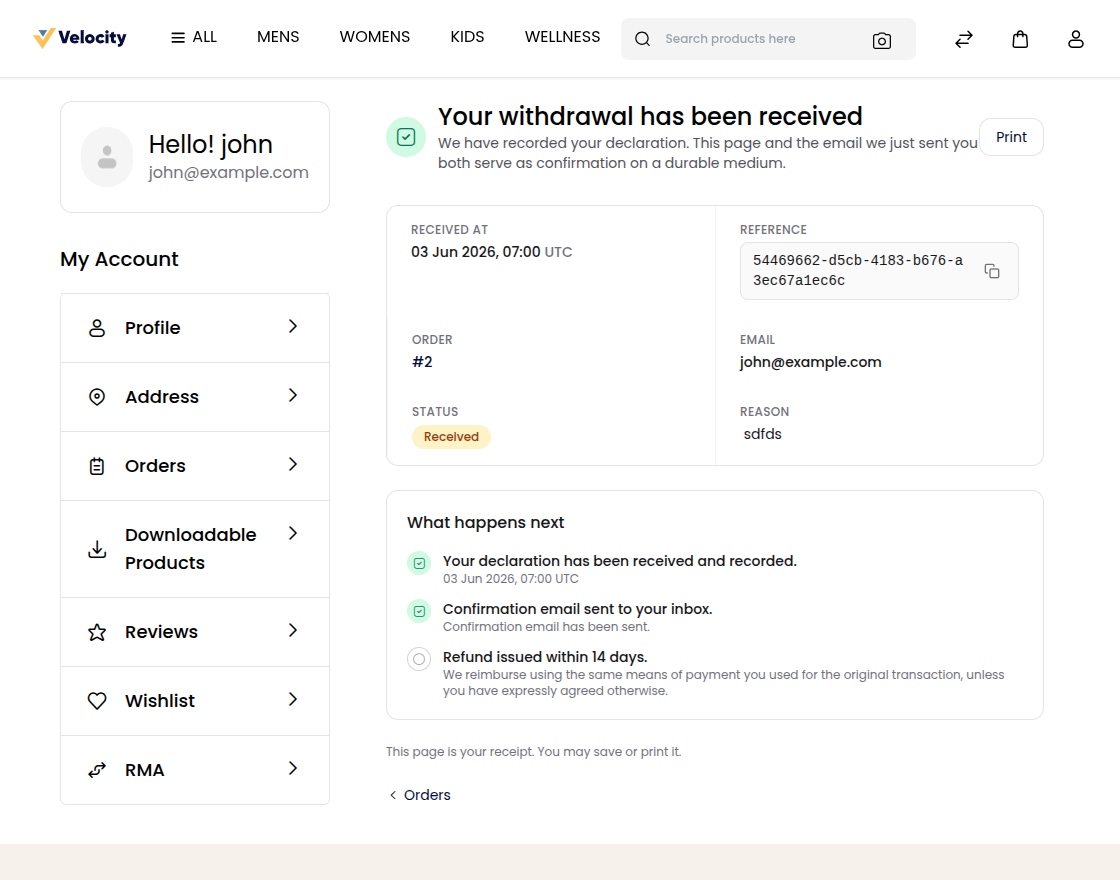
The receipt shows:
- Received at, in UTC;
- Reference, with a button to copy it;
- Order, which links to the order for signed-in customers;
- Email, Status and Reason;
- What happens next, which lists the declaration, the confirmation email and the refund or decline, with your reason when you decline.
Print prints the receipt. The customer can save or print it as their record.
The confirmation email
When a withdrawal is submitted, the customer is emailed straight away, in the language they used on the storefront. The subject is Confirmation of your withdrawal — Order and the order number. The email lists the reference, the time it was received in UTC, the order and the email, and the reason when one was given. This email is the confirmation on a durable medium that the directive requires.
You aren't emailed about new withdrawals. Check Sales >> EU Withdrawals regularly.
Manage withdrawals
The EU Withdrawals screen
Go to Sales >> EU Withdrawals. The newest withdrawals are listed first.
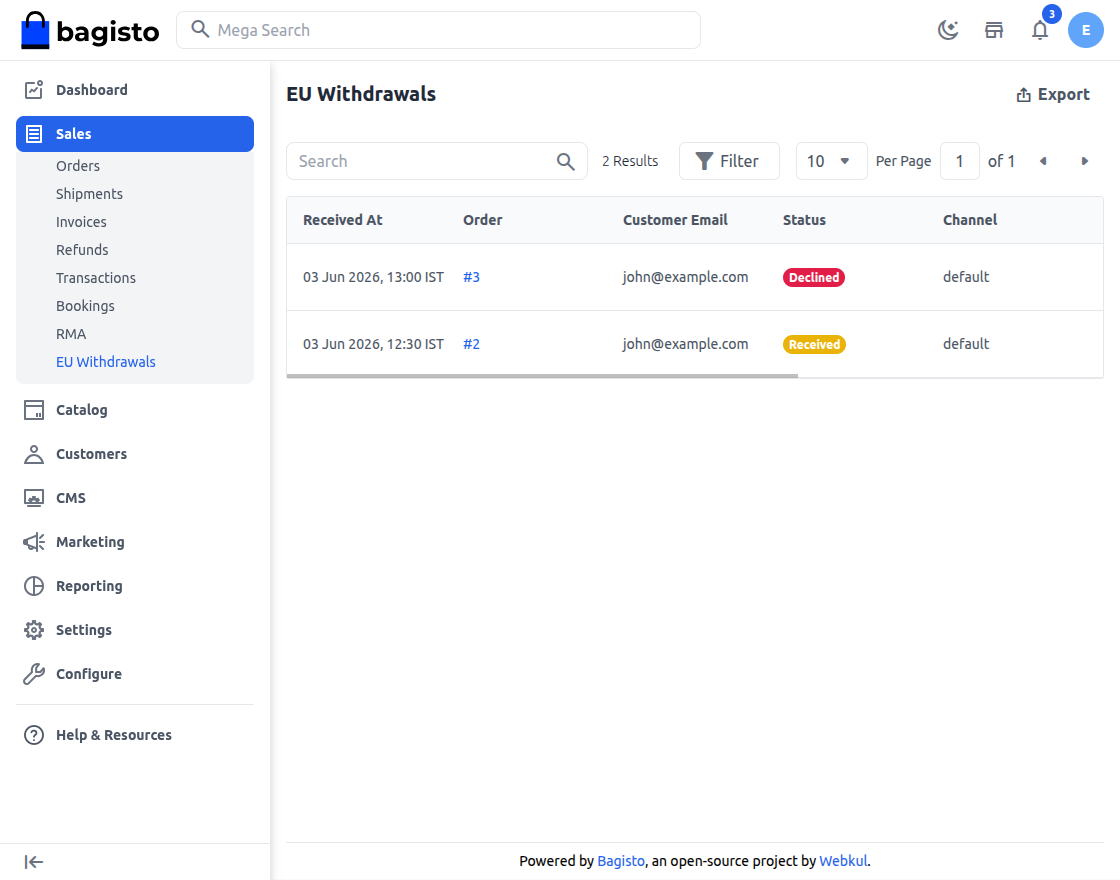
| Column | What it shows |
|---|---|
| Received At | When the customer submitted the withdrawal. |
| Order | The order number, which opens the order. |
| Customer Email | The email used at checkout. |
| Status | Received in yellow, Refunded in green or Declined in red. |
| Channel | The code of the channel the order was placed on. |
| Confirmation Sent | When the first confirmation email was sent. Empty if it hasn't been sent. |
| Reference | The withdrawal's reference, the one the customer sees. |
- Search: find withdrawals by order, customer email or reference.
- Filter: narrow the list by any column, with date ranges for Received At and Confirmation Sent.
- Export: downloads the withdrawals as a CSV, XLS or XLSX file.
- View: opens the withdrawal.
The withdrawal page
The title shows Withdrawal and its ID, with the status and Guest for a guest order. Back to list returns to the screen.
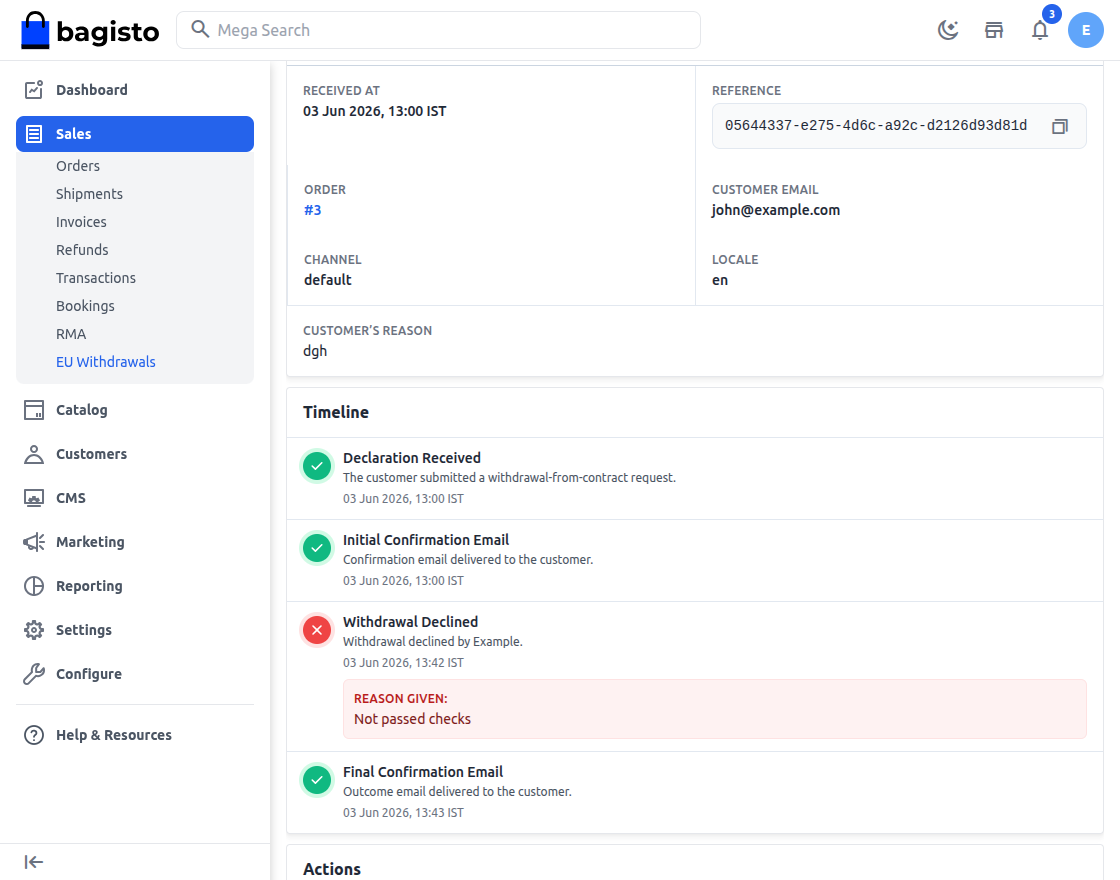
- Evidence holds what was recorded when the customer submitted, and can't be changed: Received At, Reference, Order, Customer Email, Channel, Locale and, if the customer gave one, Customer’s reason. Reference has a button to copy it. Times on the EU Withdrawals screen and this page use your store's time zone (Timezone in About); the storefront and emails use UTC.
- Timeline shows Declaration Received, then Initial Confirmation Email (sent, failed with the error, or not sent yet), then the outcome (Withdrawal Declined with your reason, Refund Issued with your note, or Resolution Pending), and, once there's an outcome, Final Confirmation Email.
- Actions holds the buttons below. Each one needs its permission.
Recording an outcome doesn't refund the customer or change the order. Refund the order with Create Refund or through a return request in RMA, then record it here.
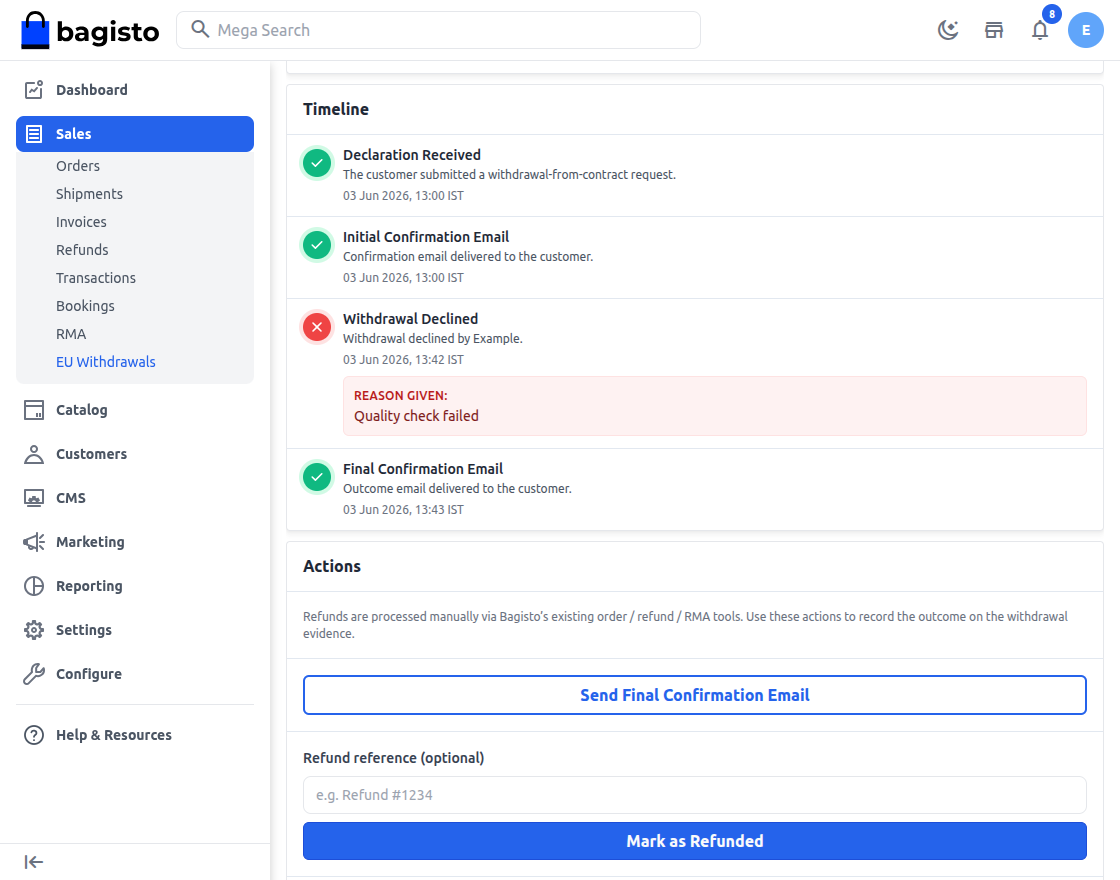
Record a refund
- Refund the order.
- Go to Sales >> EU Withdrawals.
- Open the withdrawal.
- In Refund reference (optional), enter a note such as the refund number. Up to 500 characters.
- Click Mark as Refunded.
- Click Agree.
The status becomes Refunded, and the time, your name and the reference are recorded. The customer's receipt shows the new status straight away. No email is sent. To tell the customer, send the final confirmation email. If you click Mark as Refunded again, the time, your name and the reference are replaced, so enter the reference again.
Decline a withdrawal
Decline a withdrawal when you contest the customer's right to withdraw.
- Go to Sales >> EU Withdrawals.
- Open the withdrawal.
- In Reason for declining, explain why. It's required, up to 500 characters, and the customer can see it.
- Click Decline Withdrawal.
- Click Agree.
The status becomes Declined, and the time, reason and your name are recorded. The customer's receipt shows the new status straight away. No email is sent.
Tell the customer the outcome
- Go to Sales >> EU Withdrawals.
- Open the withdrawal.
- Click Send Final Confirmation Email.
- Click Agree.
The customer receives the confirmation email again, titled Refund issued or Withdrawal declined. While a withdrawal is still Received, the button reads Resend Confirmation Email and sends the first confirmation again, for example when it failed or didn't arrive. If sending fails, you see Could not send the confirmation email. See the timeline for details. Check Email Settings and try again.
Record the outcome once
Both Mark as Refunded and Decline Withdrawal stay available after you record an outcome, and recording the other one replaces the first. If you change the outcome, send the final confirmation email again so the customer gets the new outcome.
Statuses
| Status | What it means |
|---|---|
| Received | The customer submitted the withdrawal, and it's waiting for your decision. |
| Refunded | You recorded that the order was refunded. |
| Declined | You contested the withdrawal and gave a reason. |
The withdrawal's status doesn't change the order's status.
Permissions
A role needs EU Withdrawals under Sales to see the screen, with:
- View to open a withdrawal;
- Decline for Decline Withdrawal;
- Mark Refunded for Mark as Refunded;
- Resend Confirmation for Resend Confirmation Email and Send Final Confirmation Email.