
Google Captcha
Google reCAPTCHA protects your storefront's forms from bots. It gives every request a score, and rejects requests whose score is below the threshold you set. Bagisto uses reCAPTCHA Enterprise, which needs a Google Cloud project, an API key and a site key.
Get the keys from Google Cloud
Project ID
- Open the Google Cloud console.
- Create a project, or choose an existing one.
- Copy the project ID from the project dashboard. It is not the same as the project name.
API key
- In the Google Cloud console, open the Credentials page of the APIs & Services menu.
- Create an API key.
- Copy the new key.
Site key
- In the Google Cloud console, search for the reCAPTCHA service.
- Create a key for a website, using score-based (reCAPTCHA v3) verification.
- Add your store's domain, such as
example.com. - Copy the site key.
Credentials
All settings are saved per channel, so choose the channel at the top of the screen first when your store has more than one.
- Go to Configure >> Customer >> Google Captcha.
- In Credentials, switch Status on. Project ID, API Key, Site Key and Score Threshold appear.
- Enter the Project ID.
- Enter the API Key.
- Enter the Site Key.
- Enter the Score Threshold, any number from
0to1, such as0.5, which is the default. - Click Save Configuration.
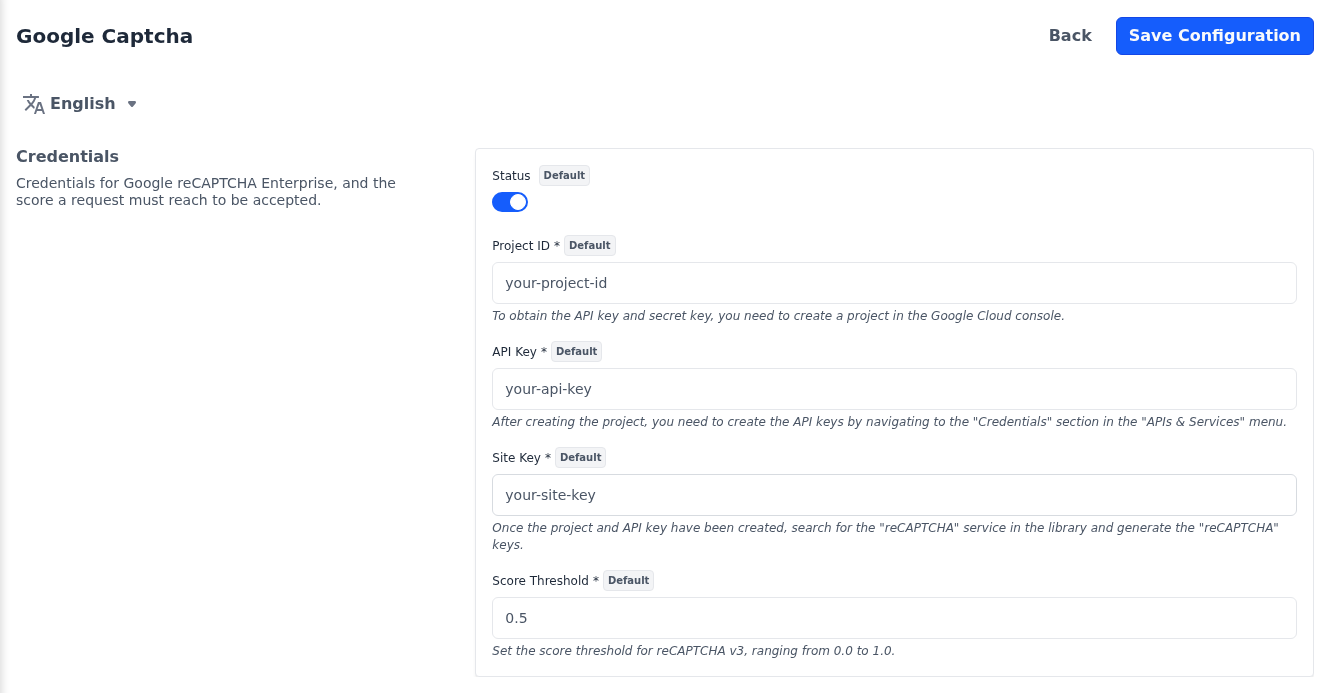
The Project ID, API Key and Site Key are required while Status is on. reCAPTCHA scores each request from 0.0, most likely a bot, to 1.0, most likely a person. A request is accepted when its score reaches the threshold, so a higher threshold rejects more requests.
WARNING
While Status is on, the protected forms reject every request if a key is missing or wrong, or Google can't be reached. After saving, sign in to the storefront once to check that the captcha accepts you.
Where the captcha is used
Once it is on, reCAPTCHA checks these storefront forms:
- Customer sign in and sign up
- Forgot password
- The Contact Us page
- The contact form on product pages, which replaces the cart buttons while the cart page is turned off under Checkout
- Sign in during checkout
The sign-up and sign-in forms are described in Customer Account.