
Product View Page
The Product view page configuration section decides how many related and up-sell products the product page shows, and whether shoppers can buy a product straight from its page. These settings apply to the whole store.
- Go to Configure >> Catalog >> Products.
- In Product view page configuration, enter the Allowed number of Related Products.
- Enter the Allowed number of Up-Sell Products.
- Switch Allow customers to directly buy products on or off.
- Click Save Configuration.
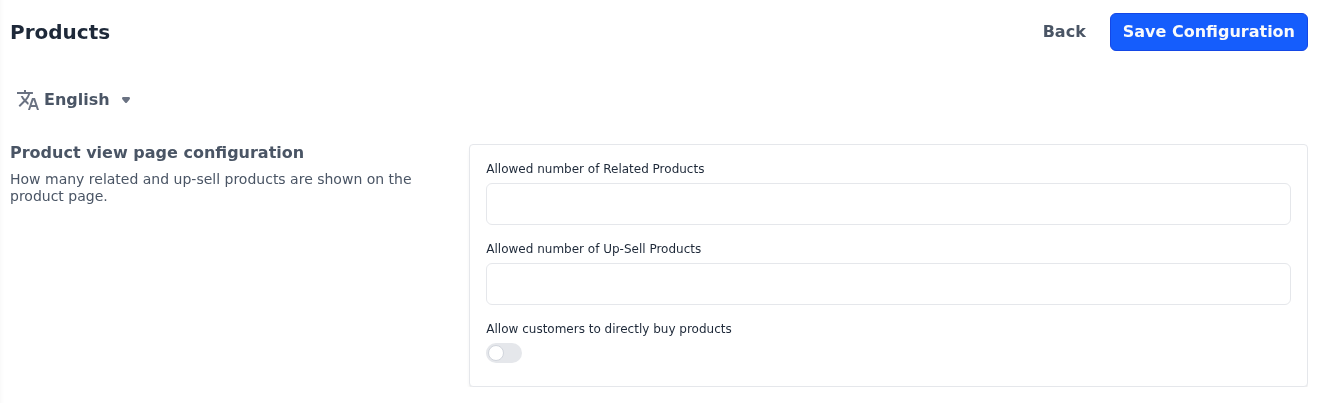
Allowed number of Related Products: How many of the related products chosen on a product are shown on its page. Leave it empty to show all of them, or enter 0 to show none.
Allowed number of Up-Sell Products: How many of the up-sell products chosen on a product are shown on its page. Leave it empty to show all of them, or enter 0 to show none.
The related and up-sell products themselves are chosen on each product; see Products.
Allow customers to directly buy products: Shows a Buy Now button beside Add To Cart on the product page. Shoppers who click it go straight to checkout with that product. The button isn't shown while Cart Page is switched off under Checkout.
Differences in Bagisto 2.4
In Bagisto 2.4, Allow customers to directly buy products is in the Storefront section.