
Review
The Review section decides who can review products and how reviews are summarized on the storefront. These settings apply to the whole store.
- Go to Configure >> Catalog >> Products.
- In Review, set the options described below.
- Click Save Configuration.
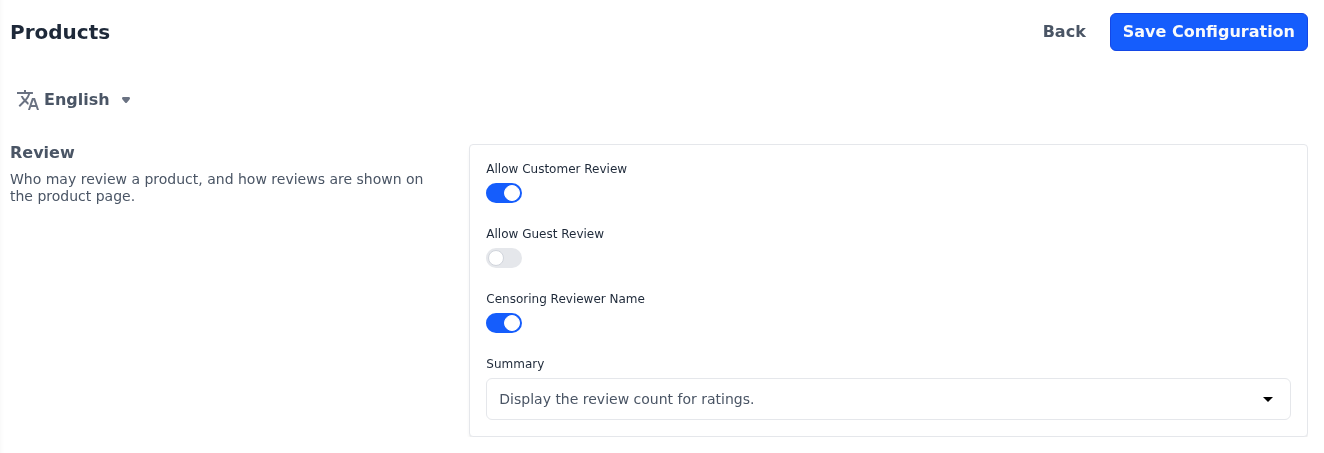
| Setting | What it does |
|---|---|
| Allow Customer Review | Shows the Write a Review button on product pages, so signed-in customers can write reviews. It's on in a new store. While it's off, the button is hidden for everyone, guests included. |
| Allow Guest Review | Also lets shoppers who aren't signed in write reviews. They enter their name with the review. It works only while Allow Customer Review is on. |
| Censoring Reviewer Name | Masks reviewer names on the storefront, keeping the first letter of each word, so John Smith is shown as J*** S****. It's on in a new store. |
| Summary | The number shown with a product's rating on product cards and product pages. Display the review count for ratings., the default, shows the number of reviews. Display the star count in ratings. shows the total number of stars given. |
New reviews are held as pending, and appear on the storefront only after you approve them under Customers >> Reviews; see Customer Reviews.
What shoppers can submit
- Title: up to 255 characters.
- Comment: up to 5000 characters.
- Add Image/Video: up to 5 photos or videos per review, each up to 10 MB.
- Up to 10 reviews or translations a minute from one shopper. After that, the store refuses more until the minute is up.